


Publishers working with video content have a new way to monetize their traffic through Kadam. Recently, Kadam has introduced Video Ads based on VAST tags, allowing website owners to display pre-roll, mid-roll, and post-roll advertising directly through their existing video players.
The format is already available in the Kadam publisher dashboard. Early performance data shows that its average CPM is higher than that of several other formats, like push, banner, and in-page advertising.
So, how does the format work, which websites can use it, and what results can publishers expect?
What Are VAST Video Ads?
VAST stands for Video Ad Serving Template. In practice, a VAST tag is a URL that connects a video player to an advertising feed.
When a user opens video content, the player sends a request through the VAST URL. It then receives an XML file containing the advertising video, display instructions, click-through links, and tracking parameters.
Depending on the website’s setup, the ad can appear:
- before the main video as a pre-roll;
- during the video as a mid-roll;
- after the content as a post-roll.
The player also sends information about impressions, views, and clicks. Publishers do not need to download or store advertising videos on their own servers.
This makes VAST a useful option for websites that already have a compatible video player and want to add another way of monetization without changing their existing setup.
The Numbers Publishers Are Seeing
The introduction of the new format follows a sharp increase in demand from advertisers.
According to Kadam’s stats, advertiser demand for video traffic on the platform has grown almost 100-times over the past six months. More than 102 advertisers are already using the format.
For publishers, bigger demand can mean stronger competition for placements, better fill rates, and more opportunities to receive higher bids.
The first websites connected to Video Ads have seen the following average results:
- CPM approximately 6x higher than push and banner;
- CPM approximately 8x higher than in-page advertising;
- an average CTR of 2.74%;
- profitability currently second only to clickunder.
Actual performance will still depend on the website, audience, GEO, content, player placement, and overall traffic quality. However, the early numbers make the format worth testing for publishers with suitable inventory.
Video Ads Do Not Replace Existing Formats
Adding video advertising does not mean that now you need to remove your current monetization tools.
Video Ads can operate alongside formats such as banner, popunder, and clickunder. Instead of competing for the same placement, these formats can monetize different stages of the user’s interaction with a page.
For example, a banner can remain visible around the content, a video ad can run inside the player, and a clickunder can monetize an additional user action.
Kadam recommends testing the following combination on suitable websites:
Video Ads + Clickunder + Banner
The best setup will vary from one website to another, so publishers should compare revenue, user engagement, and overall page performance before applying the combination across all traffic.
Which Websites Can Use the Format?
Video Ads are primarily intended for websites that already publish video content or use their own or an embedded video player.
Potential website categories include:
- streaming and entertainment platforms;
- movie and TV content websites;
- news and media websites;
- mobile websites with video inventory;
- websites already monetized with banners, popunder, or clickunder.
A large share of Kadam’s current video traffic comes from Tier 2 and Tier 3 markets, including Bangladesh, India, Egypt, Indonesia, and Uzbekistan.
The leading GEOs by publisher revenue currently include Azerbaijan, Mexico, Morocco, and Uzbekistan. Average CPM across these markets ranges from approximately $0.80 to $1.60.
These figures do not mean you should limit testing to those countries. They do, however, show that video monetization is not restricted to expensive Tier 1 traffic and can generate revenue across emerging markets.
What Publishers Need Before Connecting Video Ads
The main technical requirement is a video player that supports VAST URLs.
Publishers do not need to host advertising videos or manually update individual creatives. Kadam delivers the advertising feed through the generated VAST tag, while the player handles the display and tracking process.
Before launching, publishers should check:
- whether their player supports VAST integration;
- where pre-roll, mid-roll, or post-roll ads will appear;
- whether the placement works correctly on mobile devices;
- how the ads affect video completion and user behaviour;
- whether the format complies with the website’s existing consent and privacy setup.
Testing the format on a limited share of traffic first can help compare revenue without immediately changing the experience for their entire audience.
How to Connect Kadam Video Ads
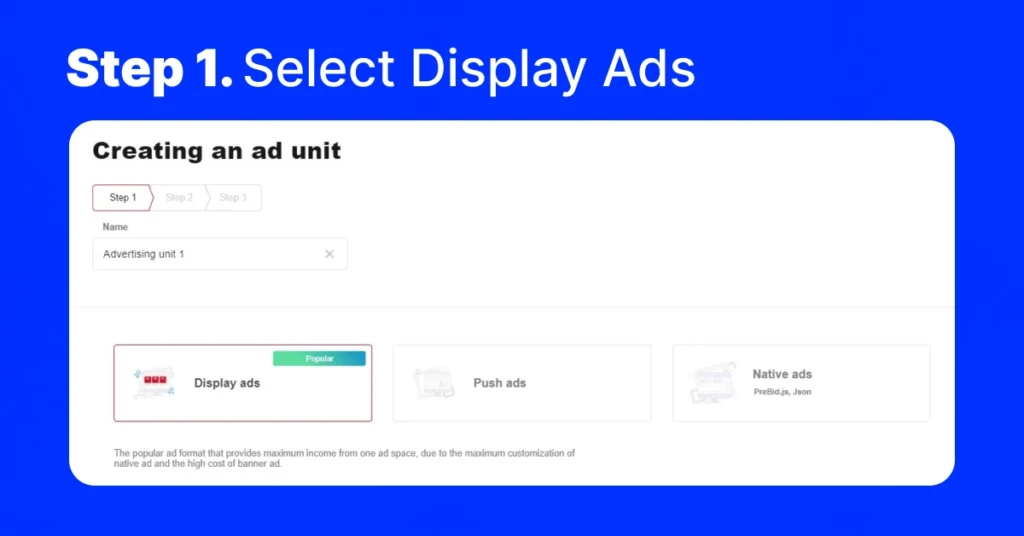
The setup is completed through the Kadam publisher dashboard:
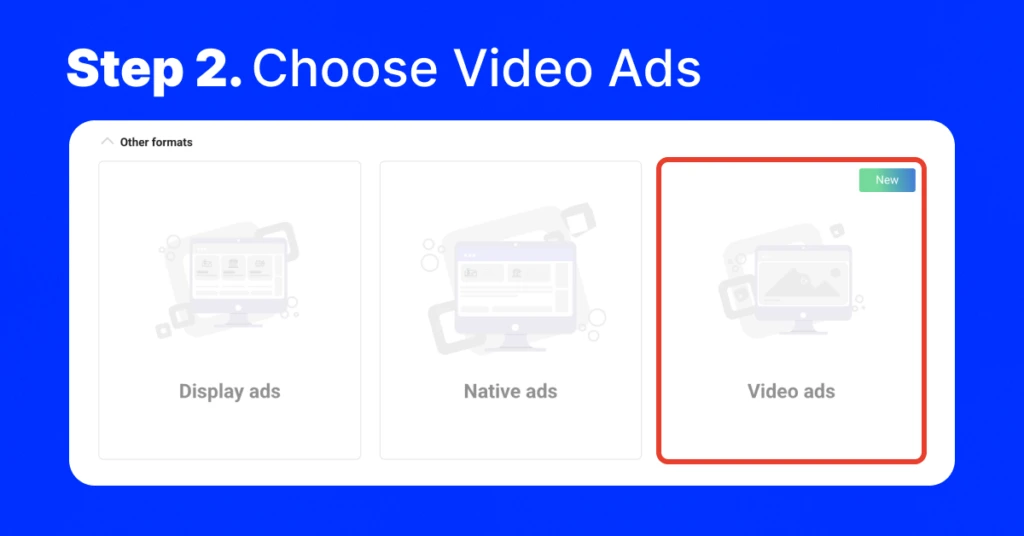
- Open the ad unit section and select Add Block.
- Enter a name for the new block.
- Select Video Ads, marked with the New label.
- Add the page address in the Page URL field.
- Specify the main keywords describing the website, such as “free downloads” or “free movies online.”
- Generate the VAST tag URL.
- Add the URL to the relevant settings in the video player.
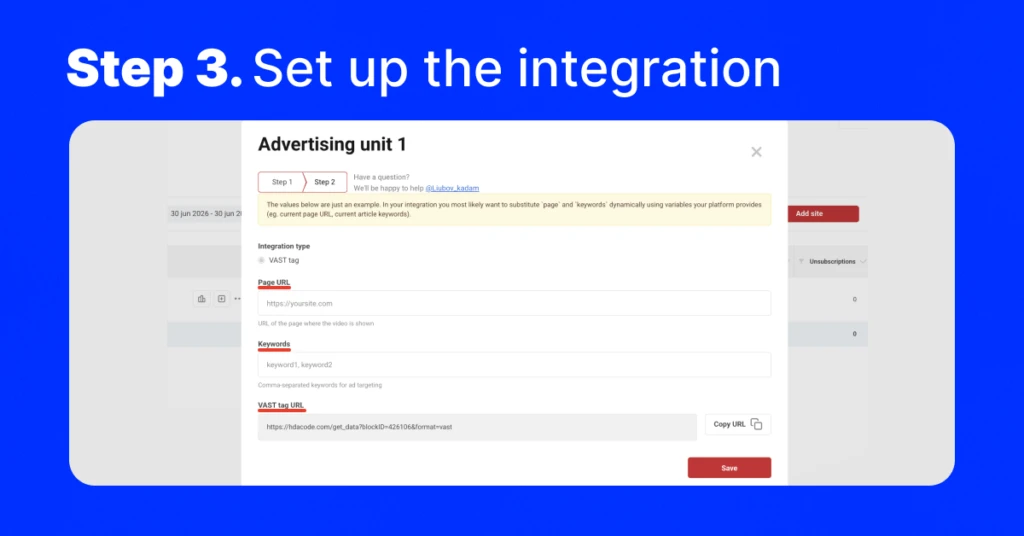
For websites with an existing VAST-compatible integration, the process should take only a few minutes.
After launch, publishers should monitor CPM, CTR, fill rate, total revenue, and any changes in content engagement. Testing different ad positions can also help determine whether pre-roll, mid-roll, or post-roll works best for a particular audience.
FAQ
What is a VAST tag?
A URL containing an ad feed for a video player. Through it the player receives the creative, its display settings, and the tracking links for statistics. You don’t store any video on your own server.
Can Video Ads run alongside other formats?
Yes. Video works together with banner, popunder and clickunder, adding a separate revenue source on pages with video content.
How long does setup take?
Create a Video block in the dashboard, add the Page URL and keywords, get the VAST tag URL and paste it into your player. With an existing integration, a few minutes.
Do I need a specific video player?
Any player with VAST (VAST 3.0) support. Most standard and embedded players include it.